Byegone: Photo Cleaner
Swipe, sort & shrink. No subs.
Byegone helps you free up space on your iPhone, calmly. Swipe through your camera roll, sweep away old screenshots and shrink huge videos. Everything happens on your iPhone, and nothing is ever uploaded.
Free to download. By using Byegone, you agree to the Terms of Service and Privacy Policy.
Byegone at a glance
- Platforms
- iPhone & iPad (App Store)
- Price
- Free
- Ads & purchases
- Ads, with a one-time Remove Ads purchase. No subscription
- Account
- Not required
- Works offline
- Yes
- Your data
- Stays on your iPhone — nothing is uploaded


Video
See Byegone in action
Features
What you can do with Byegone
Go through your photos month by month: left to say bye, right to keep.
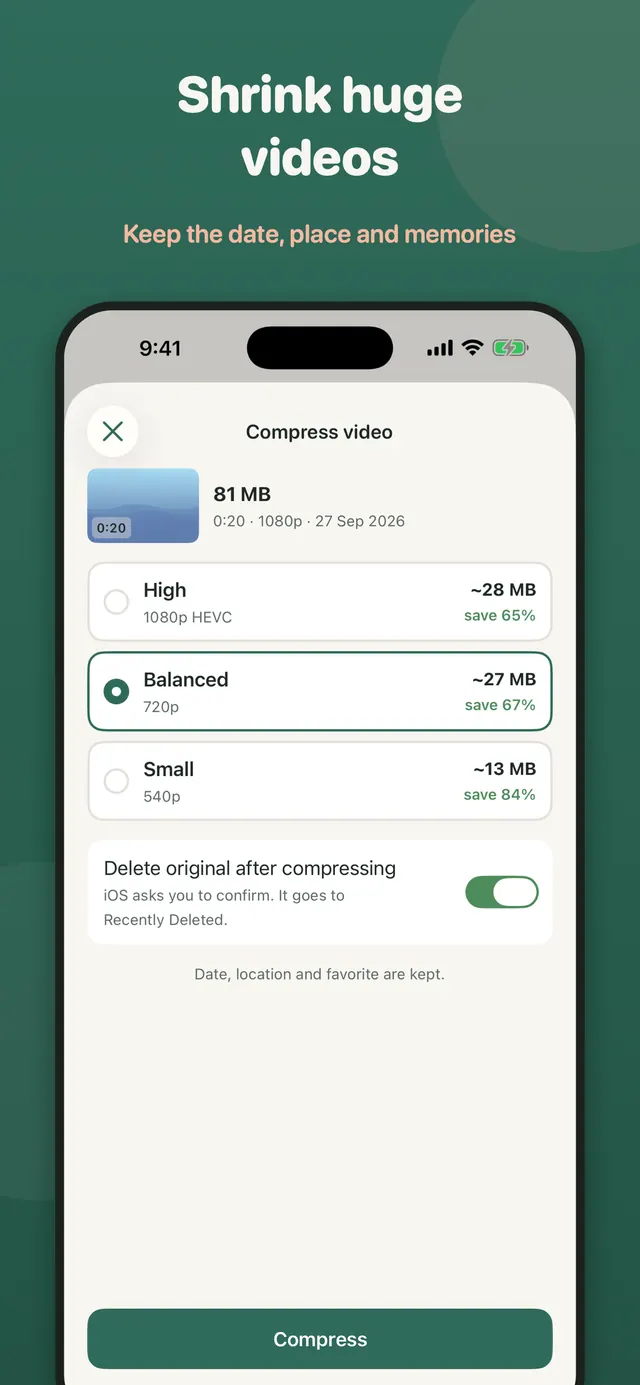
Save space and keep the original date, place and favourites.
Private and honest.
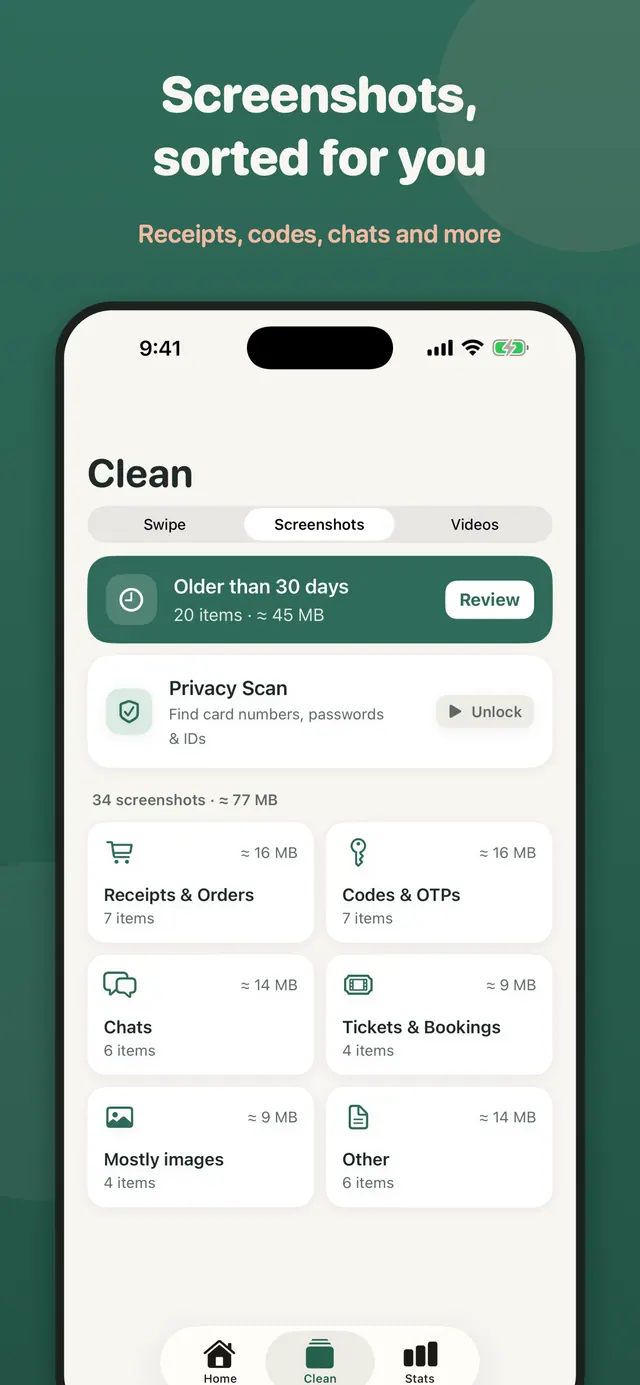
Screenshots, sorted for you
Use cases
When Byegone helps
Your iPhone says storage is almost full
Swipe through one month of photos at a time and remove the ones you don't need, then see how much space came back.
Years of old screenshots
Byegone groups screenshots into receipts and orders, codes, chats, tickets and more, so you can clear them in batches.
Large 4K videos
Shrink videos to a smaller size while keeping the original date, place and favourite status.
Byegone FAQ
What is Byegone?
Byegone: Photo Cleaner is an iPhone app by Smile Apps Studio that frees up storage. You swipe through your photos one month at a time, clear old screenshots in batches and shrink large videos, all on your iPhone.
How do I free up iPhone storage with Byegone?
Open a month, swipe left on photos you don't need and right on the ones to keep, then check everything on one review screen before deleting. Byegone shows how much space came back. You can also clear screenshots by category and compress your biggest videos.
Are my photos uploaded anywhere?
No. Sorting, scanning and compressing all happen on your iPhone. Byegone has no server that receives your photos, videos or their details.
Does Byegone delete photos without asking?
No. Nothing is deleted until you confirm, and iOS always shows its own confirmation prompt first. You can also undo your last 10 swipes.
Can I undo a deletion?
Yes. Deleted items go to the iPhone's Recently Deleted album, where you can recover them for 30 days.
How does Byegone sort screenshots?
Byegone reads your screenshots on your iPhone and groups them into Receipts & Orders, Codes & OTPs, Chats, Tickets & Bookings, Mostly images and Other. It also collects screenshots older than 30 days in one place, so you can clear a whole group in a few taps.
Does compressing a video lose the date or location?
No. You choose High, Balanced or Small quality and see the saving before you start. The smaller copy keeps the original date, location and favourite status.
Can Byegone find duplicate or similar photos?
Yes. Find similar photos groups bursts and near-duplicates and suggests the best shot to keep.
What is the Privacy Scan?
Privacy Scan looks through your screenshots on your iPhone for ones that may show card numbers, passwords or IDs, so you can decide what to remove. Nothing leaves your device.
If I stop halfway, do I lose my progress?
No. Leave any time and Byegone picks up exactly where you stopped. An optional daily reminder and streak help you keep going.
Is there a subscription?
No. Byegone is free with ads. Byegone Pro is a one-time purchase that removes ads and unlocks unlimited similar-photo scans, privacy scans and batch compression of up to 10 videos at once.
Do I need an account?
No. There is no sign-up or login, and Byegone works without an internet connection.
Which devices does Byegone work on?
Byegone is an iPhone app and needs iOS 17 or later. It is available on the App Store.
You might also like
More utilities from Smile Apps Studio →
Utility
PlainPDF: Scanner & PDF Editor
Every PDF tool, free: scan, merge, compress, sign, split and more. No account, no watermarks. Your files never leave your device. Remove ads once. No subscription, ever.
Game
Magnet Out: Puzzle Game
Hand-crafted levels of magnetic mayhem! Tap to attract, repel, and chain-react your way to PERFECT scores. No accounts, no timers — just pure puzzle brain.

Education
AI in 60 Seconds: Learn AI
Learn artificial intelligence the simple way—one 60‑second lesson at a time. Build real AI skills without coding, confusion, or endless courses.
Get Byegone
Say bye to old screenshots, extra shots and huge videos. Everything stays on your iPhone. Free with ads, or remove ads once. No subscriptions, ever.